1.
About this
document
This
document will guide you a way to change uEngine’s source codes for such
purposes: 1. Customizing uEngine to support specialized requirements. 2. Integrating
with existing system like groupware, enterprise-portals or ERPs. 3. To understand uEngine in a professional level.
2.
Overview of
uEngine Component Model
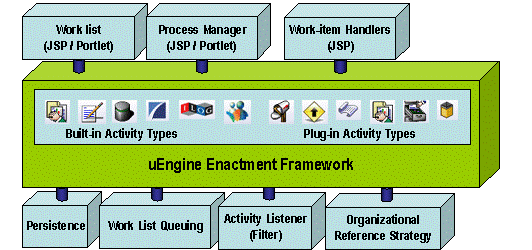
uEngine has been built on top of a component framework
that separates logic and technique so that developers can easily add new
functions without consideration of the side effect of core of the engine. The
kinds of uEngine component interfaces are :
1.
Portlets: Almost uEngine’s Client Web Pages (Process
Manager, Worklist, Process Analyzer, Charts..) are shown via standardized
portlets so that any kind of portlet engines can embed them. By default uEngine
portlets are tested in the liferay (www.liferay.com) portal.
2.
Work-item Handlers:
3.
Persistence Logic: uEngine need to stores the state of
business processes’ state, variables, role bindings in its run-time. To let
them persist, ‘ProcessInstance’ component will be used. By default, uEngine
stores the data into relational database by the class ‘EJBProcessInstance’,
which is a subclass of ‘ProcessInstance’.
4.
Worklist Queuing Service: When a task is routed to an
user, there should be a way to notify him and stores the list of tasks. UEngine
invokes the methods of ‘Worklist’ interface when a task is registered, finished
or cancelled. By default, uEngine uses the sub-class ‘JDBCWorklist’, which
stores task information into database table.
5.
Activity Listener/Filter: During a business process
perform, a number of steps will begin and complete. If you want to hook the
moments, you can use ‘ActivityFilter’ interface to be called back with those
events.
6.
Organizational Reference Strategy Component
3.
How to
build
Before learning about programming, let’s take a look
about how to build uengine.
3.1.
Download
uEngine source codes
If you have
downloaded uEngine 2.0, the distribution already contains source code as well.
You can see a directory structure like below:
|
Directory Name |
Comment |
|
src |
uengine project
directory itself. |
|
metaworks |
Metaworks project directory.
Metaworks is a sister project for uEngine’s basis framework |
|
settings |
Settings project
directory. This is also a eclipse project. This project contains only
resources like xml or properties. You may change these resources and build
(by ant) to take effect the changes in uEngine configurations. |
|
lib |
Libarary jar files |
|
was |
The JBoss directory. It’s
already bundled and configured with uEngine, liferay, mondrian and axis. |
You may change source codes from one of these projects
– src, metaworks, settings and build using ‘ant’ to take effect the changes.
3.2.
Building
uEngine
First, you need environmental settings before running
ant. Assume
that you installed uEngine in ‘c:\uEngine’. The settings would be like this:
|
C:\>set
JAVA_HOME=c:\j2sdk1.4.0_01 C:\>set
JBOSS_HOME=c:\uengine\was |
Now move to the uEngine project directory (c:\uEngine\src) and
rebuild uEngine.
|
C:\>cd
c:\uengine C:\uengine>ant Buildfile:
build.xml prepare: compile: [delete] Deleting 36 files from
C:\uengine\standalone2\src\bin ejbjar: makeJar: [jar] Building
jar: C:\uengine\standalone2\src\build\uengine.jar deploy2jboss: [copy] Copying 1
file to C:\uengine\standalone2\was\server\default\deploy [copy] Copying 2
files to C:\uengine\standalone2\was\server\default\deploy\ext.ear\portal-ejb.jar\org\uengine\admin\portlet\processmanager applySettings: [jar] Building
jar: C:\uengine\standalone2\settings\bin\uengine_settings.jar signjar: [echo]
jarfile=C:\uengine\standalone2\src/../settings/bin/uengine_settings.jar generateProcessDesignerJWS: signjar: [echo]
jarfile=C:\uengine\standalone2\src/build/uengine.jar BUILD
SUCCESSFUL Total
time: 1 minute 30 seconds |
The build process will compile, package and deploy
uEngine into the bundled JBoss as well.
3.3.
For Eclipse
Users
The three projects are all developed with eclipse, so
you can easily import those projects into your eclipse. Just use the eclipse’s “Import
from existing project” sub-menu in the “file” menu and choose those projects’
directories.
3.4.
uEngine Service
Portal – Interface “ProcessManager”
“org.uengine.processmanager.ProcessManagerBean” is a stateless bean that accepts the requests from
outside.
Following shows the coarse-grained interface
definition[1].
public String
initializeProcess(String processDefinition, String
instanceId) throws RemoteException;
public String
initializeProcess(String processDefinition) throws RemoteException;
public void executeProcess(String instanceId) throws RemoteException;
public void setProcessVariable(String instanceId, String scope, String varKey, Serializable
val) throws RemoteException;
public Serializable
getProcessVariable(String instanceId, String scope, String varKey) throws RemoteException;
public String
getProcessVariableInXML(String instanceId, String scope, String varKey) throws RemoteException;
public Hashtable
listProcessVariableValues(String instanceId) throws RemoteException;
public void putRoleMapping(String instanceId, String roleName, String endpoint) throws RemoteException;
public String
getRoleMapping(String instanceId,
String roleName)
throws RemoteException;
public Serializable
sendMessage(String instanceId,
String message,
Serializable payload)
throws RemoteException;
public Serializable
sendMessageXML(String instanceId,
String message,
String payload)
throws RemoteException;
public String[]
listProcessDefinitionNames() throws RemoteException;
public String[]
listProcessInstanceIds() throws RemoteException;
public String[]
listProcessInstanceIds(String definitionName) throws RemoteException;
public ProcessDefinitionRemote
getProcessDefinitionRemote(String processDefinition) throws RemoteException;
public ProcessDefinitionRemote
getProcessDefinitionRemoteWithInstanceId(String
instanceId) throws RemoteException;
public void addProcessDefinition(String definitionName, String
definition) throws RemoteException;
public String
viewProcessDefinitionFlowChart(String processDefinition, Map
options) throws RemoteException;
public String
viewProcessInstanceFlowChart(String instanceId, Map options) throws RemoteException;
public Hashtable
getActivityDetails(String instanceId, String tracingTag) throws RemoteException;
public String
getActivityStatus(String instanceId, String tracingTag) throws RemoteException;
public String
getProcessDefinition(String processDefinition, String
encodingStyle) throws RemoteException;
public void flowControl(String command, String instanceId, String tracingTag) throws RemoteException;
public void removeProcessInstance(String
instanceId) throws RemoteException;
public void removeProcessDefinition(String
definitionName) throws RemoteException;
[Note] To found
out for what each operation stands, see the JSP files located in
”was/server/default/deploy/uengine-web” or
javascripts provided in the script console.
3.5.
uEngine Persistence Framework
The
persistence logics are completely separated from the kernel.
uEngine gets process definitions from “org.uengine.kernel.ProcessDefinitionFactory” and instance data from
“org.uengine.kernel.ActivityInstance”. In particular, the ‘ActivityInstance’ delegate the
requests to the default implementation – EJBActivityInstance, which
uses JAXB and entity beans. Developers can write their customized persistence
mechanism for their need such as performance.
Default persistence mechanism
ProcessDefinitionFactory and EJBActivityInstance uses a mediated solution to persist the variety of
objects without restriction as possible. The solution is to serialize the
objects by XGen, which is an open-sourced JAXB toolkit, and store
their text stream in the entity beans. It is a simple but generic solution to persist a
diverse data types without complex database design. However, it is not good
solution to search or anaylize the stored data later.
The default persistence framework works with these
three entity beans and XML-serializers as follows:
1.
org.uengine.persistence.processdefinition.ProcessDefinitionRepositoryBean
l
Comment: It persists
the process definitions in XML
l Fields: ID – name of
process definition, Description – description
of the process definition, Definition – process
definition content
[Note] If you need
to analyze the process definitions based on relational database query, you may
design and write more fine-grained tables and
entity beans.
2.
org.uengine.persistence.processinstance.ProcessInstanceRepositoryBean
l
Comment: stores
basic information on process instance.
l Fields: ID – process
instance ID, Definition – its process
definition name, StartedDate – started
date and time
3.
org.uengine.persistence.processdefinition.ProcessVariableRepositoryBean
l
Comment: Stores
values of each process variable as well as data related to a process instance
such as step number of flow, role mappings, etc. It denies a
complex database design, but it is not proper to be searched or analyzed.
l
Fields: ID – just unique
id for the item, InstanceId – its
belonging process instance, KeyString – key text
for designate the value, Value – value
itself
[Note]
When you need to analyze or search from the
transactional data, we recommend to use
SQLActivity. That is,
instead of directly using the database of uEngine, create the audit data with a good form to be
processed later in an application level.
This approach will give you good performance as well
as reduced complexity.
3.6.
uEngine’s activity
component model – Composite Pattern and JavaBeans
Figure 1
shows the object model of the activity component used in uEngine.
This model is a extended version of the ‘Composite
Pattern[2]’, which is one of the most well-known design patterns.
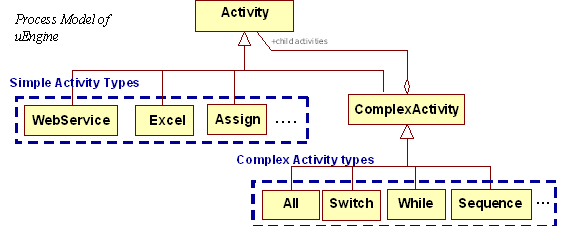
Figure
1.
Activity component model of uEngine
This
self-contained object model is good at holding a block-based flow model. And it
allows easy addition of not only simple activities, which contains only task
logics, but also complex activities, which contains the flow control logic for
its child activities.
For Instance, Web Service invocation, E-mail sending,
Human tasks are simple activities and Sequence, All, Switch, and Try~Catch is
complex activity type, which can holds the simple activities and complex
activity as child recursively.
In addition
to the meta model, uEngine activity component model follows the Javabeans’
setter/getter programming convention to allow a systemic design time support by
reflection.
Namely,
uEngine Process Designer works like a
Bean-box for the activity types and generates input forms and
related GUIs for editing the activity type by getting activity types’ object
model on the fly. This allows developers to easily add new activity types
without worrying about GUI implementation like
AWT or Swing.
3.6.1.
The main
activity classes – Activity and ComplexActivity
To
understand uEngine’s activity component model, it is good to see the
source code of
“Activity.java”
and
“ComplexActivity.java”.
[ToDo: a
collarboration diagram presents interactions between designer, enactment
server, and monitoring/admin tools with these two classes]
#Activity.java
Activity.java is composed of key attributes and methods of general
behaviors, properties and callback messages.
1.
Properties (Fields)
public abstract class Activity{
Activity
parentActivity ; // its parent
activity (an ComplexActivity)
String
name;
String
tracingTag; //
it can be a
unique identifier for the activity in a process definition tree
int
retryLimit; //
count for
retry
int
retryDelay; //
time
interval for retry (in seconds)
Role[]
roles; //
role
declarations
ProcessVariable[]
processVariableDescriptors; // process
variable declarations
2.
Constructor
public
Activity(){} //
there sould
be an empty constructor for reflection
3.
Logics called by enactment engine
These methods would be called by the
enactment engine at runtime. The usual invocation sequence is ‘createInstance à beforeExecute à executeActivity à onEvent (if done or failed) à afterExecute’.
protected
ActivityInstance createInstance(ActivityInstance instanceInCreating) throws
Exception{
return
instanceInCreating;
}
protected
void beforeExecute(ActivityInstance instance) throws Exception{}
abstract
protected void executeActivity(ActivityInstance instance) throws Exception;
protected
void afterExecute(ActivityInstance instance) throws Exception{}
protected
void onEvent(String command, ActivityInstance instance, Object payload) throws
Exception{}
4.
Logics called by monitoring/admin tools
These methods stand for monitoring and
admin time and provide some information or controls on the running processes.
They may be called by any reasons caused in the execution time as well.
protected
synchronized String getProcessStatus(ActivityInstance inst, String roleName){} // returns the status
public
void stop(ActivityInstance instance) throws Exception{} // replies to a stop request
public
void suspend(ActivityInstance instance) throws Exception{} // replies to a suspend request
public
void resume(ActivityInstance instance) throws Exception{} // replies to a resume request
public
void skip(ActivityInstance instance) throws Exception{} // replies to a skip request
public
void compensate(ActivityInstance instance) throws Exception{} // replies to a undo request
public
ActivityDesigner createDesigner(){} // provides a GUI for editing this activity
public
Map getActivityDetails(ActivityInstance inst){// provides activity details with keyed-values
return
details;
}
public
ValidationContext validate(){} // returns validation result with the current
configuration of the activity.
// This method may usually be invoked at the design time.
5.
Utility methods
public
Activity getRootActivity(){ return root; } // returns the most parent activity
public
ProcessDefinition getProcessDefinition(){ // returns the ProcessDefinition this activity belongs
return
(ProcessDefinition)getRootActivity();
}
public
void fireComplete(ActivityInstance instance) throws Exception{
// developer use this method to demarcate
where the activity succeed
onEvent(ACTIVITY_DONE,
instance, null);
}
public
void fireFault(ActivityInstance instance, Exception fault) throws Exception{ //use when the activity has failed
onEvent(ACTIVITY_FAULT,
instance, fault);
}
}
#ComplexActivity.java
ComplexActivity.java is a subclass of the Activity.java , which is
extended in terms of management facilities for its child activities.
public class ComplexActivity
extends Activity {
1.
Properties (Fields)
private
Vector childActivities; // a vector holds its child activities
2.
Constructor
public
ComplexActivity(){}
3.
[Concrete method] The overriden ‘createInstance’ method – initializes its own properties as well as
the childs’.
public
ActivityInstance createInstance(ActivityInstance instanceInCreating) throws
Exception{
super.createInstance(instanceInCreating);
//Sets
current running state
instanceInCreating.set(getTracingTag(),
"currentStep", "0");
//Lets
each child activity initialize process instance
Vector
childActivities = getChildActivities();
for(Enumeration
enum = childActivities.elements(); enum.hasMoreElements(); ){
Activity
child = (Activity)enum.nextElement();
child.createInstance(instanceInCreating);
}
return
instanceInCreating;
}
4.
The overridden ‘executeActivity’ method – will contains its flow control
logic. Following is the example of the sequence.
protected
void executeActivity(ActivityInstance instance) throws Exception{
int
currStep = getCurrentStep(instance);
if(currStep
>= childActivities.size()){
instance.fireDone();
fireComplete(instance);
return;
}
Activity
childActivity = (Activity)getChildActivities().elementAt(currStep);
childActivity.executeActivity(instance);
// The actual code uses JMS
}
5.
The overridden ‘onEvent’ method – This method processes not only its own
messages but also childs’ messages so that it can listen to the status of its
childs.
protected
void onEvent(String command, ActivityInstance instance, Object payload) throws
Exception{
//dispatching
leaf childs
if(command.equals(CHILD_DONE)){
int
currStep = getCurrentStep(instance);
currStep++;
setCurrentStep(instance,
currStep);
executeActivity(instance); //execute next
}else
super.onEvent(command,
instance, null);
}
….
}
[Note]
To see more realistic examples of the activity types,
take a look at the activity classes located in the package org.uengine.kernel. Their
names end with ‘~Activity’.
3.6.2.
The most
parent activity class - ProcessDefinition
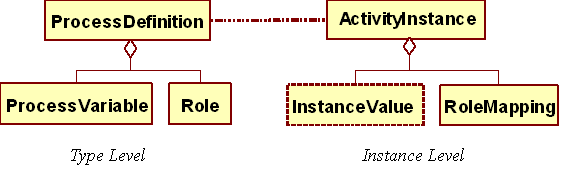
The class
ProcessDefinition is the complex activity on the most higher place which holds
a whole process definition tree. Since this class extends the SequenceActivity,
the child activities are routed sequencially and includes several additional
methods for representing a process definition.
3.6.3.
Class Role and Class RoleMapping
The class Role represents a business role within a process
definition and the class RoleMapping is an instance of the Role declaration.
Class Role holds the identifier of the role definition and RoleMapping stores the actual worker’s email
address or the system’s endpoint
URI.
3.6.4.
Class ProcessVariable
ProcessVariable has the fields like process variable name, class type
or QName (if its type is XML).
The real value will be set via ‘ActivityInstance::set’ method.
3.6.5.
Process
Definition Tree
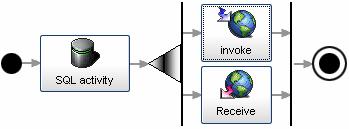
uEngine’s
process definition instances will form a tree-structure based on the activity
component model we’ve learned. Following is an example.
public class
SimpleProcess extends
ProcessDefinition{
public SimpleProcess(){
setProcessVariables(new ProcessVariable[]{
new ProcessVariable(
"name", "testvar",
"type", String.class
}),
new ProcessVariable(new Object[]{
"name", "purchaseOrder",
"type", String.class
})
});
Activity act = new SQLActivity();
addChildActivity(act);
ComplexActivity comp = new AllActivity();
WebServiceActivity wact = new WebServiceActivity();
wact.setRole(Role.forName("worker"));
wact.setPortType("WQSService");
wact.setOperationName("orderWork");
wact.setParameters(new Object[]
{
"writePurchaseOrder",
"http://localhost:8085/axis/services/TroubleTicket",
null,
"parameter"
});
wact.setOutput(ProcessVariable.forName("result"));
comp.addChildActivity(wact);
AssignActivity assignAct
= new
AssignActivity ();
assignAct.setVariable(ProcessVariable.forName("testvar"));
assignAct.setVal("content");
comp.addChildActivity(assignAct);
addChildActivity(comp);
ReceiveActivity receive
= new
ReceiveActivity();
receive.setOutput(ProcessVariable.forName("purchaseOrder"));
receive.setMessage("PurchaseOrderArrived");
addChildActivity(receive);
}
}
3.7.
The
component framework of uEngine – Open Kernel Framework
uEngine is based on a component framework that not only constantly
enhances its functionality but also keeps up its quality and initial design.
Especially, uEngine’s component-based development
approach by refined in the workflow-based development provides a provated
system analysis and development methodology. That is, this approach guides
developers to produce more reusable components in the process-oriented business
applications. Figure 2 shows an
UML that presents
OKF’s operations with activity types.
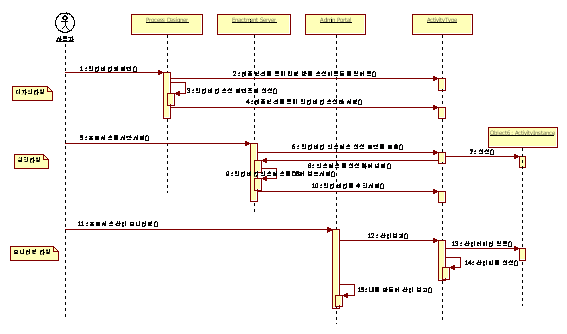
Figure
2.
‘Inversion of Control’
of
Open Kernel Framework
The kernel
(hot-spot) of the OKF manages all the application controls and invoke methods
of activity component during the lifecycle of process instances i.e. Design,
Validation, Monitoring, Viewing, Persistence, Execution. This ‘inversion of control’ promotes an easy, stable,
and managed development without worrying about technical issues.
3.7.1.
An activity
type implementation example
The source
code listed below is an example of activity type implenmentation showing how
uEngine and the activity type components interact with each other.
public class SQLActivity extends
Activity{
//Activity
property declarations /////////////////////////////
//----------------------------------------------------------
//
Each property should have
its setter/getter following the javabeans programming convention
// so that uEngine’s framework can access
the values by reflection APIs.
TextContext
sqlStmt;
public
TextContext getSqlStmt(){
return
sqlStmt;
}
public
void setSqlStmt(TextContext value){
sqlStmt
= value;
}
String
connectionString;
public
String getConnectionString(){
return
connectionString;
}
public
void setConnectionString(String value){
connectionString
= value;
}
String
userId;
public
String getUserId(){
return
userId;
}
public
void setUserId(String value){
userId
= value;
}
String
password;
public
String getPassword(){
return
password;
}
public
void setPassword(String value){
password
= value;
}
String
driverClass;
public
String getDriverClass(){
return
driverClass;
}
public
void setDriverClass(String value){
driverClass
= value;
}
public
SQLActivity(){}
public
ActivityInstance createInstance(ActivityInstance instanceInCreating) throws
Exception{
super.createInstance(instanceInCreating);
//Make a space to store the instance property for result log
instanceInCreating.set(getTracingTag(),
"resultLog", "");
return
instanceInCreating;
}
public
void executeActivity(ActivityInstance instance) throws Exception{
Class.forName(getDriverClass());
Connection
con = DriverManager.getConnection(getConnectionString(), getUserId(),
getPassword());
PreparedStatement
prepStmt = con.prepareStatement(getSqlStmt().parse(this, instance));
ResultSet
rs = prepStmt.executeQuery();
if(rs.next()){
ByteArrayOutputStream
resultLog = null;
try{
ResultSetMetaData
rmeta=rs.getMetaData();
for(int
i=1; i<=rmeta.getColumnCount(); i++){
String
fieldName = new String(rmeta.getColumnName(i));
instance.set("",
fieldName, (Serializable)rs.getObject(fieldName));
}
}catch(Exception
e){
...
e.printStackTrace(new
PrintStream(resultLog));
}
if(resultLog!=null)
instance.set(getTracingTag(),
"resultLog", resultLog.toString());
}
prepStmt.close();
fireComplete(instance);
}
public
Map getActivityDetails(ActivityInstance inst){
Hashtable
details = (Hashtable)super.getActivityDetails(inst);
details.put("actual
executed SQL", );
return
details;
}
}
After
compilation and registering the new activity component, uEngine will provide
systemic services like design time support as you can see below:
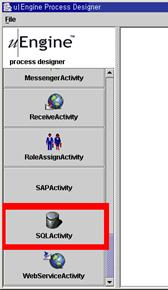
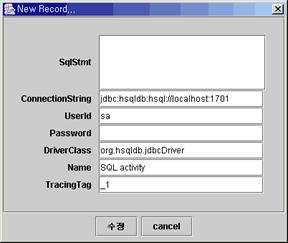
<ToDo: plus monitoring time
image>
3.7.2.
Other
component interfaces
There are several
kinds of component interfaces around the actvitity component, which is aiming
to support extended functionalities over the whole lifecycle of workflow
management.
Following
component interfaces are all related to an activity component.
l
Process Viewers
(org.uengine.kernel.viewer.*)
¨
Comment:
Viewer components to generate HTMLs that shows a flow
chart of a process definition or a running process instance.
¨
Interface:
public interface ActivityViewer{
// Reads given acitivity’s properties and render its flow
chart in HTML. And returns it.
StringBuffer
render(Activity act, ActivityInstance inst, Map options);
}
¨
Naming rule: [ActivityName]Viewer ex)
SQLActivityViewer
¨
Time to be used: Monitoring
¨
Caller classes: org.uengine.processmanager.ProcessManagerBean
l
Activity Descriptors
(org.uengine.kernel.descriptor.*)
¨
Comment:
Classes that contains description attributes on
acitivty types. They are commonly used in the design time and provides metadata
for GUI generation. The ‘Metaworks’ framework is related to this component
interface.
¨
Interface:
(A subclass of class ‘Table’, which is a component
interface of metaworks framework. See metaworks developer guide for details)
¨
Naming rule:
[ActivityName]Descriptor ex)
SQLActivityDescriptor
¨
Time to be used: Design, Monitoring
¨
Caller classes:
l
Activity Designers
(org.uengine.kernel.designer.*)
¨
Comment:
GUI components that edit given activity definition.
¨
Interface:
public interface ActivityDesigner{
public
Activity getActivity(); //returns
editing activity
public
void setActivity(Activity value);
public
void onDropped(java.util.Vector components);//will be
called when an activity is dropped on this activity
public
ComplexActivityDesigner getParentDesigner(); //returns the
parent activity’s editor
public
void openDialog(); //open an
editing form window for editing this activity
public
java.awt.Component getComponent(); //returns an
actual awt(or swing) control
}
¨
Naming rule:
[ActivityName]Designer ex)SQLActivityDesigner
¨
Time to be
used:
Only Design
¨
Caller classes: Activity designers will be created by the org.uengine.kernel.Activity’s method ‘getActivityDesigner‘ and org.uengine.processdesigner.ProcessDesigner will use them.
l
Activity Image
(org.uengine.kernel.images.*)
¨
Comment:
Icon image files that represents each activity type
¨
Naming rule:
[AcitivityName].gif ex)SQLActivity.gif
¨
Time to be
used:
Design,
Monitoring
And following
component interfaces are commonly used over the uEngine’s systems
l
Unified Serializers (org.uengine.components.serializers.*)
¨
Comment:
This interface provides a standard protocol to access
variety kinds of serialization mechanisms.
¨
Interface:
public interface Serializer{
public
boolean isSerializable(Class cls);
//returns
whether this
public
void serialize(Object sourceObj, OutputStream os, Hashtable extendedContext)
throws Exception;
public
Object deserialize(InputStream is, Hashtable extendedContext) throws Exception;
}
¨
Naming rule:
[NameOfMechanism]Serializer ex)BPELSerializer,
BeanSerializer, AxisSerializer
¨
Time to be
used:
All the time
¨
Caller
classes:
uengine.kernel.GlobalContext
l
Process Model Adapters
(org.uengine.processpublisher.*)
¨
Comment:
Adapter interface to import or export of uEngine
process model into various process languages or formats. When user requests another expression of uEngine
process definition, uEngine first converts the source model into the
destination model by using these adaptors and then the corresponding
serializers would emits proper XML with these converted objects into the
destination language.
¨
Interface:
public
interface Adapter{
public Object convert(Object
src, Hashtable keyedContext) throws Exception;
}
¨
Naming Rule:
Importer:[LanguageName]/importer/[SourceLanguageActivityName]Adapter
Exporter:[LanguageName]/exporter/[DestinationActivityName]Adapter
ex)
WebServiceActivityAdapter
¨
Time to be
used:
All the time
¨
Caller
classes:
The serializers for each language.
ex)
BPELSerializer.java of BPEL
l
Relation Strategies
(org.uengine.components.relations.*)
¨
Comment:
This interface component-ize relations among human
resources or business partners. A Strategy
pattern. An example usage of relation strategies is dynamic
staff resolution.
¨
Interface:
public
interface Relation {
public RoleMapping
findRelative(RoleMapping roleMap);
}
¨
Naming Rule:
[RelationName]Relation
¨
Example:
An relation strategy for resolving headquarter’s
endpoint.
|
public class
HeadQuarterRelation implements org.uengine.kernel.Relation{ public
RoleMapping findRelative(RoleMapping roleMap) { //Extracts the headquarter’s endpoint from
database and binds it to ‘headquarter’ return
headquarter; } } |
3.7.3.
Activity
Component Directory Structure
This
section will explain how to pack uEngine activity components and plug them into
uEngine kernel.
uEngine activity component is a jar file that follows
the directory structure and the metadata format as described below:
Directory Structure:
|
Mycom.jar +
META-INF + MANIFEST.MF + activitytypes.xml +
com + [companyname] + [projectname] + [ActivityTypeName].class + images + [ActivityTypeName].gif + viewer + [ActivityTypeName]Viewer.class + descriptor + [ActivityTypeName]Descriptor.class + designer + [ActivityTypeName]Designer.class |
An instance of metadata file:
|
<?xml
version=”1.0” encoding="UTF-8"?> <java
version="1.4.0_01" class="java.beans.XMLDecoder"> <object
class="java.util.ArrayList"> <void method="add"> <string>com.mycom.PDFGenerationActivity</string> </void> </object> </java> |
After creating
a jar file, You use the ant target to register the component as follows:
|
Ant
DeployActivityTarget -Dparam.component.dir=<location of the jar file> -D
param.component.file=<name of the jar file> |
[Note] You can see ‘was/server/default/deploy/mycom.jar’ for a
reference.
3.8.
Metaworks
framework
Metaworks is the acronym of
“metadata-oriented application integration
framework”, which automates implementation of software
components like SQL, UI, Web, EJBs by referencing metadata of application
objects.
It gives benefits from central management and
change-propagation of metadata and promotes a declarative programming. For
example, changes only in metadata XML will propagate over all of the technical
implementations automatically.
Plus, metaworks’ development methodologies like
‘Customization from default application’ and
‘JIT UI personalization’ will dramatically reduce the time-to-market and the
cost.
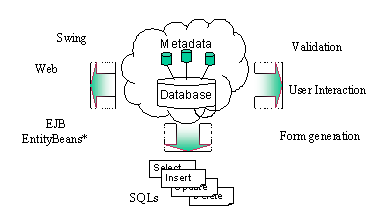
Metaworks was used in the implementation of uEngine process
designer and the work-item handler.
[Note]
Metaworks is an uEngine’s
sister project and can work as standalone.
For detail,
see http://metaworks.sourceforge.net.